rFactor's way ....
rFactor's way of skinning a car is simple. You have one texture per veh-file. (Those set up on each car/driver ingame.) Every driver has his very own car texture and is
completely independent from any other texture.

CTDP's way...
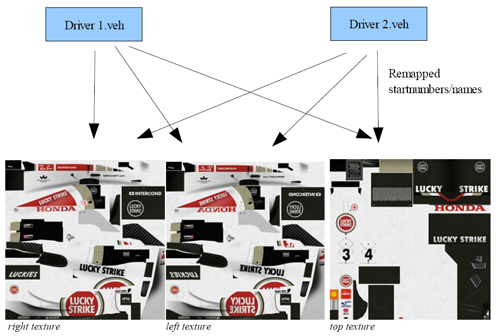
CTDP used a different way of mapping for years. It's a development of GP4's way to map on 3 textures. We improved this by mapping all side parts on textures 1 and 2,
which are identical in mapping, but only have horizonally flipped logos. So 1 is for the right side of the car, 2 is left.
Texture 3 is the top side or shared material. Usually all cars apply to this standard, so far only Williams uses a fourth texture.
This may sound as a disadvantage at first, as we use 3 times the texture size of a single ISI-FIS-car. The thing is, that both our drivers share the same 3 textures.
So not every driver has uniqe textures anymore, but instead driver 2 has the same textures, just slightly remapped. I think the following chart should explain quite well.
This way of texturing wasn't supported by ISI at the beginning. You could use it, but the Skinning-feature to select own skins in the menu didn't work. Thanks to ISI for
adding this, although it was not easy to implement, we are glad we can use this, since it will make your day way easier.
Of course every rule has it's exceptions. A case where this occurs is McLaren which has 3 textures per driver.
Disclaimer
It's not allowed to copy anything from this package without an explicit permission from CTDP.
You use this MOD on your own risk! We're not responsible in case of problems.
You do not have permission to put this package on any cover-cds without our explicit permission!
This modification may not be distributed for any commercial purposes!
You may freely use this template to paint own cars. They may only be used in the CTDP 2005 mod.
The textures may be distributed freely without explicit permission from CTDP.
Webmasters can upload this template, but to keep the overview we want to get informed about mirrors.
Getting it ingame
One of the best features in my opinion as a painter is the menu-skinning feature, where you can install new skins for a car and simply choose them from within the menu.
This is the way how you can use it for CTDP05, however it may vary from other mods.
Short excursion on materials. Every car has a DefaultLivery set up in the veh-file and it can also have several Extra-Materials assigned for the livery.
Now we have this DefaultLivery and 2 Extra set up.
Skins in rF are generally put into a folder "-name of the veh-file-SKINS". We already included those.
So if you want to install your skin, first rename your textures. You first give the DefaultLivery(Usually the leftside, so either _1 or _right)
any name "newName.dds"
The left-side and top (_2, _3 or _left, _top) are now called "newNameEXTRA0.dds" and "newNameEXTRA1.dds"
just put the newName.dds in this SKINS-folder and the newNameEXTRA-files in the Misc-folder within the Skins-Folder.
Prepare a nice little newName.txt-file in the Skin-folder like the ones we included and you are all set.
To share your skin, prepare an archive which has the newName.dds and the newName.txt in it's root and has a subfolder Misc, with the Extra-Textures.
For installing all you do is simply extract in the skins-folder of the second person and he is all set as well.
Have fun with your skins!